

















Table of Contents
- • Fotor Review Summary
- • About of Fotor Image Editing
- • Other opinions about Fotor
- • Comprehensive Overview of Fotor
- • Fotor Review
- • Fotor Basic Review
- • Fotor Pro Review
- • Fotor Pro+ Review
- • Fotor Pros & Cons
- • Using Fotor AI Editor
- • Fotor Subscription and Pricing
- • Fotor Refund Policy
- • Fotor Digital Delivery Information
- • Contact Fotor Support
- • Where to buy Fotor?
- • Conclusion of Fotor reviews & ratings
Fotor Review Summary
Fotor is an online photo editor that offers a range of tools for image enhancement and creative design. It generally provides accessible features suited for both casual users and those with intermediate skills. While the platform tends to deliver effective AI-powered editing options, some limitations in advanced raw file processing and workflow organization are noticeable. Overall, Fotor performs as a versatile but somewhat basic editor.
Highlights
- Suitable for casual and semi-professional users
- Offers photo editing, AI tools, and design templates
- Limited raw file support and lacks comprehensive photo management
- Balanced toolset with a 3.8/5 user satisfaction rating
Within the broader landscape of photo editing software, Fotor occupies a middle ground with useful AI features but lacks advanced workflow capabilities found in competitors. Users seeking deeper control or pro-level editing might consider alternatives. For more detailed information, see the Fotor review.
About of Fotor Image Editing
Editing and enhancing photos can be complex, especially for users without specialized skills or software. Many need accessible tools that simplify tasks like retouching, background removal, and creative design. Efficient solutions help users save time while improving image quality for personal or professional use.

Fotor is an online photo editing and graphic design tool designed to meet these needs. It offers a wide range of features including AI-powered image enhancement, background removal, and design templates. Positioned as a versatile platform, Fotor caters to both casual users and professionals seeking quick, effective visual content creation.
Fotor supports over 300 million users globally and has received recognition as a top developer on Google Play. Its multi-platform availability across web, desktop, and mobile ensures broad accessibility. While praised for user-friendly design and AI capabilities, some users note limitations in raw file processing and photo organization compared to professional-grade software.
This overview is intended to help users evaluate if Fotor suits their photo editing needs. For a deeper assessment of its strengths and weaknesses, see this Fotor review. The platform offers a range of creative tools, but users looking for advanced workflow or extensive format support might find trade-offs worth considering.
Other opinions about Fotor
Opinions and insights gathered from trusted review articles and authoritative websites covering Fotor.
Comprehensive Overview of Fotor
Fotor is an online photo editing and graphic design platform that provides users with a suite of tools for image enhancement, manipulation, and creative content creation. Originating as a multi-platform application, it supports desktop and mobile interfaces to facilitate accessibility for a wide user base. The platform integrates both basic editing features and advanced artificial intelligence-powered tools to streamline the editing process.
Fotor review highlights the platform's evolution into a comprehensive design and editing tool that combines photo editing, AI image generation, and video creation, enabling users to produce a variety of visual content. It serves artistic professionals, amateurs, and businesses by offering tools ranging from basic photo adjustments to generative AI functionalities. The platform includes features such as background removal, collage making, and portrait retouching.
The service operates on a freemium model with multiple subscription tiers providing enhanced capabilities and cloud storage options. Development efforts focus on expanding AI integrations and improving user interface design to increase usability. Ongoing updates aim to refine performance, extend creative assets, and support cross-device synchronization to enhance workflow efficiency.
Fotor Review
Fotor is a versatile online platform focused on photo editing and AI-powered image and video generation. It caters to a range of users from beginners to professionals, offering a variety of editing options through an accessible interface. The platform integrates AI enhancements to simplify creative processes and improve output quality.

Fotor provides extensive tools that cover basic photo adjustments, AI-driven enhancements, background removal, and creative effects. It supports multiple file formats, including raw camera files, and is available across web, desktop, and mobile devices. Its combination of photo editing and AI generation positions it as a comprehensive solution for visual content creation.
Fotor Highlights- Wide range of AI editing tools
- Creative effects and layout options
- Supports multiple file formats
- Cross-platform accessibility
- User-friendly interface
Fotor Basic Review
Fotor Basic is a free, perpetual plan targeting casual users who require fundamental photo editing and design capabilities. It offers limited free AI credits and access to straightforward editing tools and templates with watermark-added exports.
This plan is suitable for beginners or those wishing to explore the platform without a financial commitment. Users gain access to essential features but face restrictions on premium AI models and export quality.
The plan includes basic editing tools, 512MB of cloud storage, and exports in JPG, PNG, or PDF formats with watermarks. It is priced at US$ 0, making it accessible for those seeking basic editing options without cost.
Check Price • fotor.com
Fotor Pro Review
Fotor Pro provides full access to AI-powered editing tools and a broad range of premium effects designed for users requiring advanced capabilities. It supports up to 10 concurrent AI image generations and offers an extensive library of over 100 editing tools.
This plan is aimed at frequent users and professionals who need watermark-free exports and enhanced cloud storage with a capacity of 2GB. Users can also engage in up to 1,000 AI chat interactions for efficient creative workflows.
The subscription is priced at US$3.33 per month or US$39.95 annually, offering HD and transparent PNG export options. This package is tailored to enhance productivity with a balance of powerful features and cloud-based flexibility.
Price $3.33 • fotor.com
Fotor Pro+ Review
Fotor Pro+ offers advanced features tailored for power users and businesses, including AI batch editing and the ability to manage multiple brand kits. It also supports enhanced collaboration with expanded cloud storage and organized project folders.

This plan is designed for creators who require extensive AI usage and consistent branding tools. The 100GB cloud storage provides ample space for large projects and files.
Pricing for Fotor Pro+ is set at US$ 5.24 per month or US$ 134.32 per year. It includes 30 concurrent AI generations and 2,000 AI chat interactions, facilitating efficient and productive workflows.
Price $5.24 • fotor.com
Fotor Pros & Cons
Fotor offers a broad range of AI-powered photo and video editing tools, making it suitable for both beginners and professionals. Its creative layout features and numerous templates provide users with versatile design options, supported across web, desktop, and mobile platforms. The platform also fosters user engagement through an active community and AI challenges, complementing its generative AI capabilities for images and video.
However, users should be aware of some limitations such as weak raw camera file conversion and the lack of comprehensive photo organization and workflow tools. The interface can feel disjointed with features spread across different modules, and the subscription model combined with credit-based paywalls may be confusing. Additionally, there are some usability quirks like limited undo functionality that might affect the editing experience.
- • Diverse AI-powered editing tools
- • Strong creative and layout features
- • User-friendly interface
- • Cross-platform support
- • Affordable tiered pricing
- • Generative AI for images and video
- • Active community engagement
- • Weak raw camera file conversion
- • Limited photo organization tools
- • Disjointed interface design
- • Complex subscription and credit system
- • Limited undo functionality
Using Fotor AI Editor
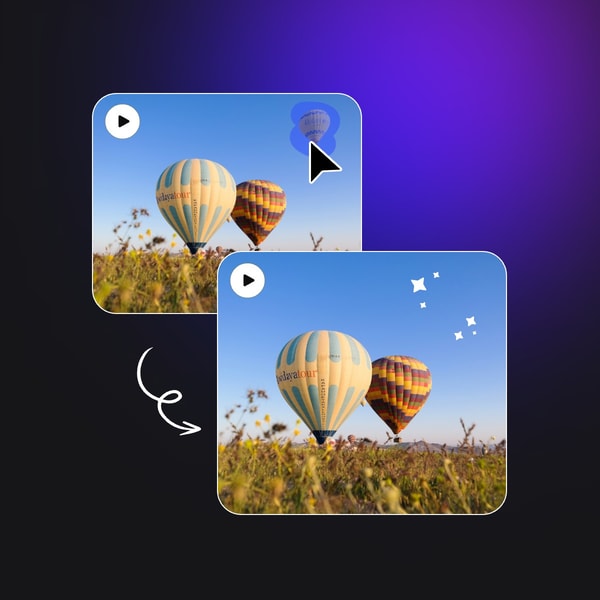
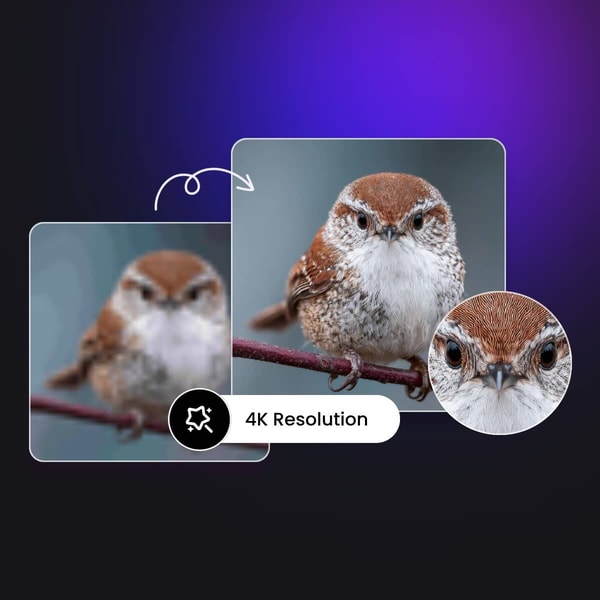
Fotor’s AI Editor uses artificial intelligence to simplify the editing of photos and videos. It allows users to enhance image quality, remove backgrounds, replace objects, and expand images beyond their original boundaries with automated AI tools. The platform supports creating images and videos from text descriptions, offering flexibility for graphic design and social media content.
Key features include one-click photo enhancement, sharpening, and unblurring; AI background removal for transparent PNGs; object removal and replacement through text prompts; natural image expansion with an image extender; and AI-generated avatars and headshots for personalized profiles. These tools enable users to quickly transform photos and videos with minimal manual effort.
Fotor Subscription and Pricing
Fotor's pricing consists of three tiers: Basic (free), Pro, and Pro+. Each tier provides varying access to AI tools, cloud storage capacity, limits on concurrent AI tasks, and export quality options. The Basic plan offers essential editing features with watermarked exports and limited AI credits, while the Pro plan unlocks a broader range of AI tools for regular users. The Pro+ plan is designed for advanced users and businesses, including batch editing and brand management features.
Subscriptions are available with monthly or annual billing, and unused credits can roll over for up to five months if the subscription remains active. Feature availability differs clearly between plans, and there is no option for a one-time purchase, as all access requires a subscription. Users should carefully consider their requirements, as some AI features consume credits even within active subscriptions.
Fotor Refund Policy
The policy does not specify a particular time frame for returns or cancellations. No fees are mentioned for returns or cancellations.
Subscription cancellations can be managed through account settings and take effect at the end of the billing period. Refunds for canceled subscriptions are generally not granted unless otherwise stated, and users are advised to review the terms before subscribing.
Fotor Digital Delivery Information
Fotor's digital services are accessible worldwide through web and app platforms. Users can access the service via downloadable desktop applications for Windows and Mac, as well as mobile apps for iOS and Android available through their respective app stores. No physical goods are provided or shipped as part of the service.
Access to Fotor's online tools is instantaneous upon account creation or subscription. Service availability depends on the user's internet connection and device compatibility. There are no shipping costs or tracking since all services and products are delivered digitally.
Contact Fotor Support
Users can reach Fotor's customer support through several channels available on their website and app. Support is accessible for help and inquiries via email and a help center with tutorials and FAQs.
- Email: [email protected]
- Help center with tutorials and FAQs
- Social media platforms and community forums
Response times may vary, with priority given to paying subscribers. Providing detailed information when contacting support helps facilitate quicker resolution of issues.
Where to buy Fotor?
Fotor is officially available for purchase and use through its website, where users can create an account, access customer support, and review clear policies for usage and subscriptions; the platform at fotor.com provides a reliable environment for these processes. Buyers can expect to use a suite of photo editing and AI tools, though marketplace experiences may vary, and offline availability or policies might differ, which suggests that official channels offer the most consistent and transparent option for obtaining Fotor services.
Conclusion of Fotor reviews & ratings
Fotor holds a significant place in photo editing, offering a range of tools that balance user-friendliness with creative flexibility. Its strengths lie in AI-powered enhancements, background removal, and a variety of artistic effects that cater to both casual users and enthusiasts. The platform’s versatility is well represented on fotor.com, making it a practical choice for diverse editing needs.
Exploring Fotor’s features can provide a meaningful way to improve and personalize photos with confidence. Readers interested in a thorough look can revisit this perspective at Fotor review, where insights into its capabilities and considerations are thoughtfully presented.
Editorial notes reflect aggregated buyer feedback and our independent editorial review of publicly available information. They are for informational purposes only and do not constitute endorsements. Purchases are made at your own discretion, and we are not responsible for transactions or outcomes related to this store. Experiences may vary. This content is assisted by AI and reviewed by our editorial team. While we strive for accuracy, AI-supported information may not always be 100% precise, so please verify any critical details.

